


HRMS Leave Management: How Businesses Can Automate Employee Leave Tracking
Introduction
Every month, someone asks: “How many casual leaves do I have left?” HR opens a spreadsheet. A manager approved leave on chat but payroll did not know. Sound familiar? HRMS leave management fixes this by putting requests, balances, approvals, and attendance in one system, so you automate employee leave tracking instead of reconciling it at salary time.
This guide explains what HRMS leave management includes, why Indian SMEs automate it, which features matter, and how to roll out leave tracking without disrupting payroll or shop-floor attendance.
What is HRMS leave management?
HRMS leave management is the leave module inside a Human Resource Management System. It handles:
- leave types and accrual rules (monthly, yearly, pro-rata)
- employee self-service apply and balance view
- multi-level approval workflows
- team leave calendar and conflict checks
- integration with attendance, shift roster, and payroll
- audit trail for compliance and disputes
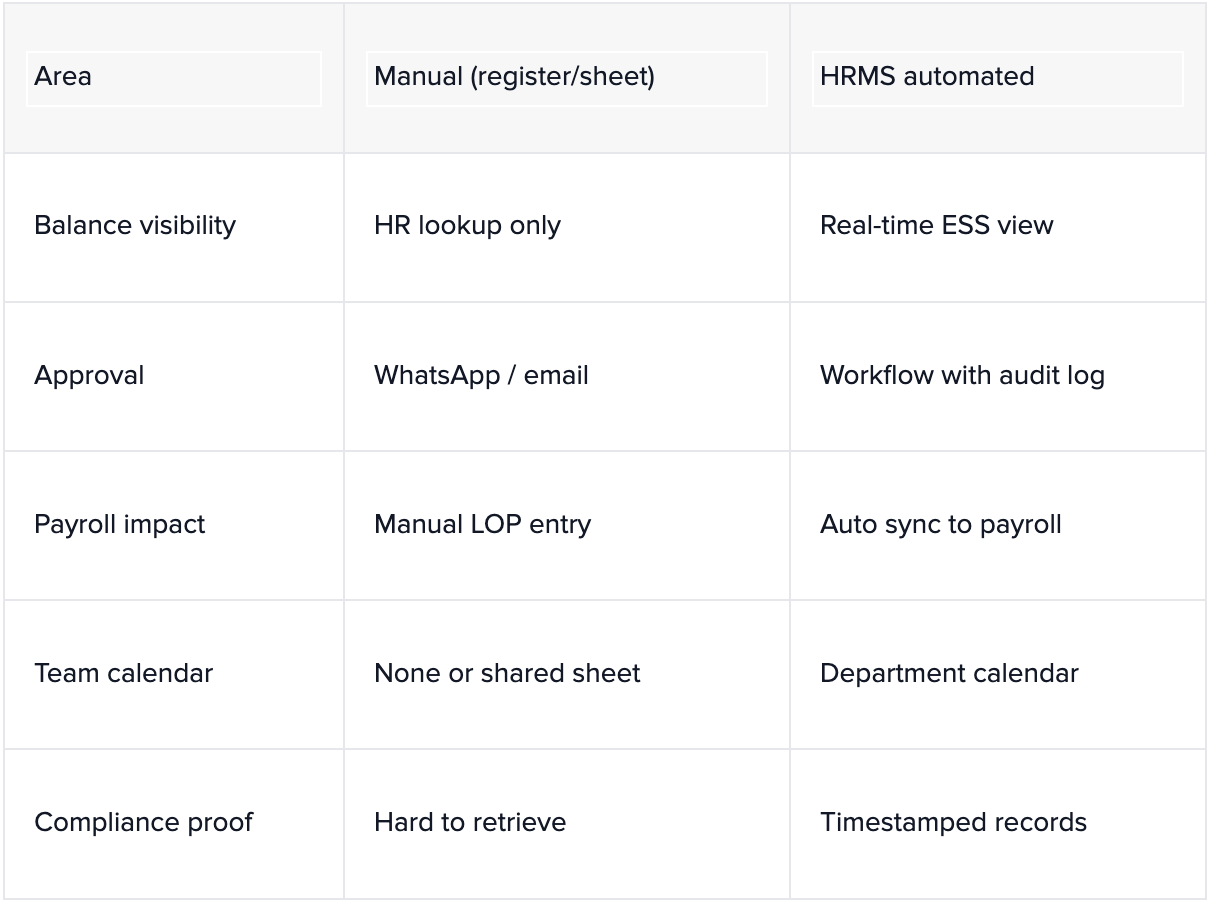
When leave lives outside HRMS, in registers or shared sheets, errors show up as wrong salary deductions and unhappy teams. Automation makes leave a data process, not a monthly argument.
Why automate employee leave tracking?
1) Payroll stays accurate
Approved leave flows to payroll automatically. You reduce loss-of-pay mistakes and last-minute paysheet edits. Connect HRMS with finance via Tally integration software or ERP systems in accounting when salaries post from ERP.
2) Managers see coverage before they approve
Production, retail, and service teams cannot run thin on the same day. HRMS leave management shows who is already out before a manager clicks approve.
3) Employees trust the process
An Employee Self-Service (ESS) portal or mobile view lets staff apply, upload medical proof if needed, and track status, without standing at HR’s desk.
4) HR focuses on people, not data entry
HR teams at growing SMEs spend hours copying leave into attendance devices or Excel. Automation frees time for hiring, policy, and engagement, see how tailored ERP solutions improve business efficiency.
Manual vs automated leave tracking
Key features to configure in HRMS leave management
- Policy engine , CL/SL/EL accrual, carry-forward, encashment rules
- Approval matrix , reporting manager, HR, plant head by location or grade
- Half-day and hour-based leave , for factories and shifts
- Holiday calendar , state-wise optional holidays
- Comp-off linking , tie extra work days to leave credit
- Attendance integration , biometric or mobile punch validates absence
- Notifications , email or app alerts on apply, approve, reject
Manufacturers with multiple shifts need leave tied to roster planning, similar to how machine shop management software aligns people with production schedules.
How to automate employee leave tracking (step-by-step)
- Document policies , types, accrual, probation rules, approval levels.
- Clean employee master , department, manager, location, date of joining.
- Configure HRMS leave types , match policy names employees already use.
- Set opening balances , migrate from spreadsheet or prior year.
- Pilot one department , run parallel with old process for one pay cycle.
- Train managers and ESS users , short videos beat long manuals.
- Connect payroll , validate LOP and encashment on first closed month.
- Go company-wide , retire informal WhatsApp approvals.
Follow a structured rollout like any module in an ERP implementation guide, map, configure, test, train, go-live.
Odoo HRMS vs spreadsheets: what growing businesses pick
Spreadsheets work until headcount crosses roughly 30–50 employees or you add a second location. Odoo HR bundles leave, attendance, payroll, and recruitment in one stack, often the fastest path for mid-market firms. Compare best ERP software in India for growing businesses, why Odoo ERP delivers better ROI for manufacturers, and Microsoft Dynamics 365 vs Odoo if you are shortlisting platforms.
Common mistakes when rolling out HRMS leave management
- Configuring software before HR documents written policy
- Skipping manager training, approvals stall and employees blame “the system”
- Not syncing with biometric attendance, leave approved but machine marks absent
- Over-customizing on day one instead of starting with standard workflows
Where Nakshatra fits: HRMS leave + payroll + ERP
Nakshatra Solutions implements Odoo HRMS and custom HR modules with HRMS leave management, attendance, payroll, appraisals, and ESS portals, built around your approval chains and factory rules. We deliver end-to-end from requirement study to go-live and AMC across India. Evaluate partners via how to choose an Odoo ERP implementation company in India or regional support such as Odoo customization in Mumbai and ERP customization services in Kolhapur.
FAQ: HRMS leave management
What is HRMS leave management?
The HRMS module that tracks leave types, balances, requests, approvals, and payroll impact in one system.
Why automate leave tracking?
Fewer payroll errors, faster approvals, team visibility, and less HR admin time.
Does it integrate with payroll?
Yes, approved leave should sync to payroll and optionally to Tally or ERP finance.
Which leave types to configure?
CL, SL, EL, optional holidays, maternity/paternity, comp-off, per your company policy.
How long to implement?
Often 2–6 weeks for SMEs after policy mapping and data migration.
How can Nakshatra help?
Odoo and custom HRMS with leave, attendance, and payroll, visit nakshatrainfo.com
Closing: leave policy deserves a system, not a spreadsheet
HRMS leave management turns employee leave tracking from a monthly fire drill into a reliable workflow. When leave connects to attendance and payroll, teams trust balances, and leadership trusts the numbers on the paysheet.
Ready to automate leave tracking? Contact Nakshatra Solutions for Odoo HRMS or custom HR implementation tailored to your workforce.
.svg)





